Start by choosing a workflow. The examples below illustrate GitFlow, GitHubFlow, and TrunkBased/preview1 histories; read each example with its configuration. The trunk-based examples use the experimental preset without overrides.
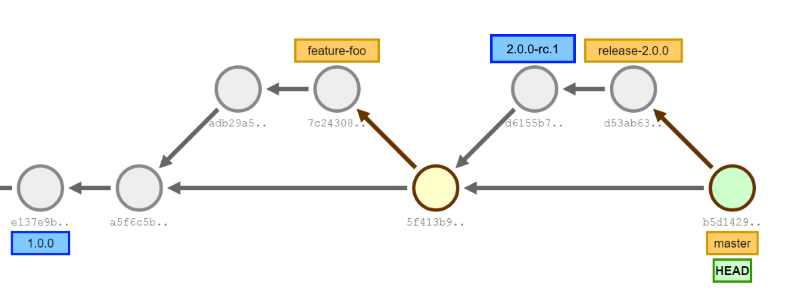
At each commit sha GitVersion will calculate:
e137e9 -> 1.0.0+0
a5f6c5 -> 1.0.1+1
adb29a -> 1.0.1-feature-foo.1+1 (PR #5 Version: `1.0.1-PullRequest.5+2`)
7c2430 -> 1.0.1-feature-foo.1+2 (PR #5 Version: `1.0.1-PullRequest.5+3`)
5f413b -> 1.0.1+4
d6155b -> 2.0.0-rc.1+0 (Before and after tag)
d53ab6 -> 2.0.0-rc.2+1 (Pre-release number was bumped because of the tag on previous commit)
b5d142 -> 2.0.0+0 (2.0.0 branch was merged, so main is now at 2.0.0)
This is just a small sample of the way GitVersion works. The idea is you inspect the configuration alongside its resulting versions. Depending on the selected workflow, configured branch types can include:
maindevelophotfix/feature/support/release/- pull requests (stash, github and a few others)
If you have other branch types GitVersion is entirely configuration driven, so check out the configuration section to make GitVersion work for you.
| Overview | An overview of the different branching strategies supported by GitVersion |
| Git Flow | The Git Flow branching strategy allows for more structured releases |
| GitHub Flow | GitHub flow is a simpler and pull request-driven branching strategy |
| Trunk-based (preview) | Configure and evaluate the experimental TrunkBased workflow |
| Contribute Examples | Contribute examples of how GitVersion works for your branching strategy |